*Ubuntu based
Uninstalling previously installed Nvidia drivers
sudo apt-get remove --purge '^nvidia-.*'
sudo apt autoremove
sudo apt install ubuntu-drivers-common -y
rebootsudo: Runs the command with superuser privileges.
'^nvidia-.*' : Anything Nvidia related.
ubuntu-drivers-common: This is a meta-package that provides common tools and utilities for managing drivers in Ubuntu, particularly for graphics cards (like NVIDIA or AMD).
-y: A flag that automatically confirms the installation prompt without requiring user input. It stands for "yes," so it skips the confirmation step.
Add the repository
sudo add-apt-repository ppa:graphics-drivers/ppaadd-apt-repository: A tool used in Ubuntu systems to manage and add new software repositories or PPAs.
ppa:graphics-drivers/ppa: PPA to be added, which is maintained by the graphics-drivers team for providing updated NVIDIA drivers.
List available drivers
ubuntu-drivers devicves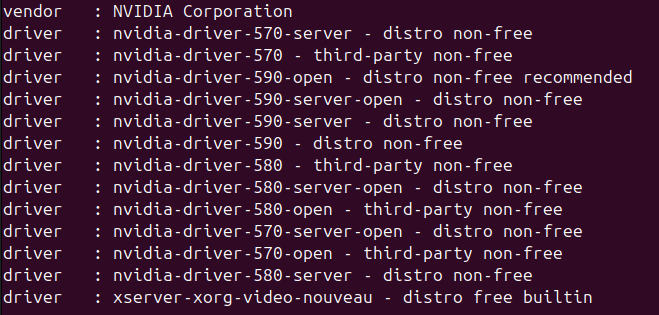
(Manual) Pick a driver version and install
sudo apt install nvidia-driver-590-open
(Alternate) auto install the recommended one
sudo ubuntu-drivers autoinstall
Reboot
rebooteither use reboot command or restart your computer (system)
'Study' 카테고리의 다른 글
| How to install LM Studio on Linux (1) | 2026.01.24 |
|---|---|
| Maslow's Hierarchy of Needs & ERG Theory (0) | 2026.01.14 |
| How to register your custom email domain (0) | 2026.01.06 |
| How to connect Linux from Windows (Remote Desktop through XRDP) (0) | 2025.12.06 |
| Linux commands to see something similar to Windows Task Manager (0) | 2025.11.22 |